Now live on Microsoft Store
AI-Powered Computer Vision Dataset Creation.
LabelBlend is an AI-powered workspace for building computer-vision-ready datasets faster — image and video annotation, AI-assisted segmentation and labeling, object tracking, synthetic data and dataset export in one Windows desktop application.
Built for AI engineers, researchers, computer vision developers, students and technical teams.
Product demo
See LabelBlend in action
A complete walkthrough of the workspace, from loading images and AI-assisted labeling to dataset review and export.
The demo covers the six LabelBlend workspaces — prompt labeling, video to dataset, mask segmentation, the manual annotation editor, synthetic data composition and the annotation viewer — in the order you would use them on a real project.
Launched
LabelBlend is live on Microsoft Store
Both editions are publicly available today. Install from the Microsoft Store on Windows 10 or 11 and get updates automatically.
Products
Two editions, one workspace
Start free with LabelBlend Lite, or run the full AI-assisted pipeline with LabelBlend Pro.
LabelBlend Lite
Free
The accessible way to start with LabelBlend. Manual rectangle and polygon annotation, class management, basic augmentation and dataset workflows, export and the annotation viewer — everything you need to produce a first dataset by hand.
- ✓Manual annotation: rectangles and polygons
- ✓Object class management with colours
- ✓Basic augmentation and dataset workflows
- ✓Dataset export and annotation viewer
- ✓Light and dark application themes
LabelBlend Pro
₹749in India
The professional edition for teams and practitioners who want the AI-assisted pipeline: SAM2 segmentation, text-prompted labeling, video object tracking, synthetic data generation and batch dataset workflows.
- ✓AI-assisted annotation with SAM2 segmentation
- ✓Text-driven multi-class labeling (GroundingDINO)
- ✓Video object tracking and video to dataset
- ✓Synthetic data generation with auto annotations
- ✓Batch workflows and advanced annotation tools
- ✓Everything included in LabelBlend Lite
Product overview
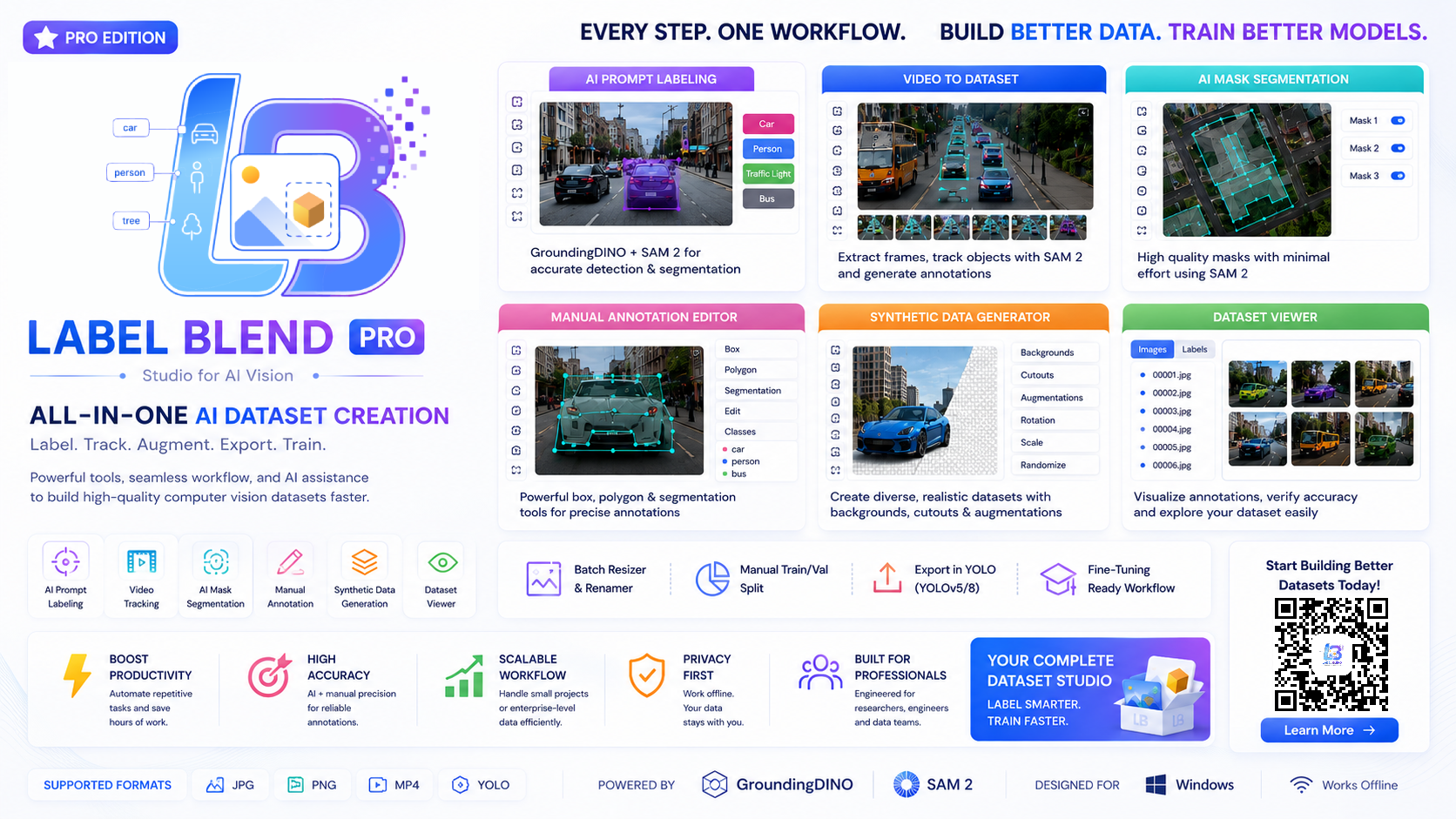
Every Step. One Workflow.
A single view of everything LabelBlend Pro brings together — AI prompt labeling, video to dataset, mask segmentation, manual annotation, synthetic data and dataset review.
The problem
Building Computer Vision Datasets Takes Time.
Most of the effort in a computer vision project is spent before training starts. The work is not difficult — it is repetitive, spread across several tools, and easy to get subtly wrong.
Collecting images
Sourcing and organising raw media before any labelling can start.
Manual labelling
Drawing boxes and polygons object by object, image after image.
Segmentation masks
Producing pixel-level masks is slower than drawing boxes.
Video frames
Extracting frames, then re-labelling the same object again and again.
More samples
Small datasets need additional variation before training is useful.
Reviewing annotations
Checking every label for misses, drift and wrong classes.
Correcting mistakes
Fixing bad annotations usually means reopening another tool.
Organising files
Images, labels, classes and splits have to line up exactly.
Exporting
Converting everything into the folder structure a trainer expects.
The approach
One Workspace for the Entire Dataset Workflow.
LabelBlend brings multiple computer vision data workflows into one application so you can move from raw media to training-ready datasets without constantly switching between different utilities.
- ▪Manual and AI-assisted annotation share the same canvas and class list.
- ▪Video frames, synthetic images and real photos end up in one dataset structure.
- ▪Review happens against the same files you are about to export.
- ▪Models are downloaded and managed inside the app, not scattered on disk.
Core workflow
From raw media to an AI-ready dataset
Every stage feeds the next one inside a single project folder.
Sources
- Images
- Video
- Text prompts
- Cutouts
- Backgrounds
Annotation
- Manual boxes
- Polygons
- AI assistance
AI Models
- SAM2 segmentation
- Object tracking
- Prompt labeling
Synthetic
- Composition
- Scale & rotation
- Auto annotations
Review
- Edit
- Validate
- Inspect overlays
Export
- Box dataset
- Mask dataset
- Train / val split
Images · Video · Text · Objects · Backgrounds → Annotation → Segmentation, Tracking, Labeling → Synthetic Data → Review → Export → AI-Ready Dataset
Product showcase
See the application, not a mockup.
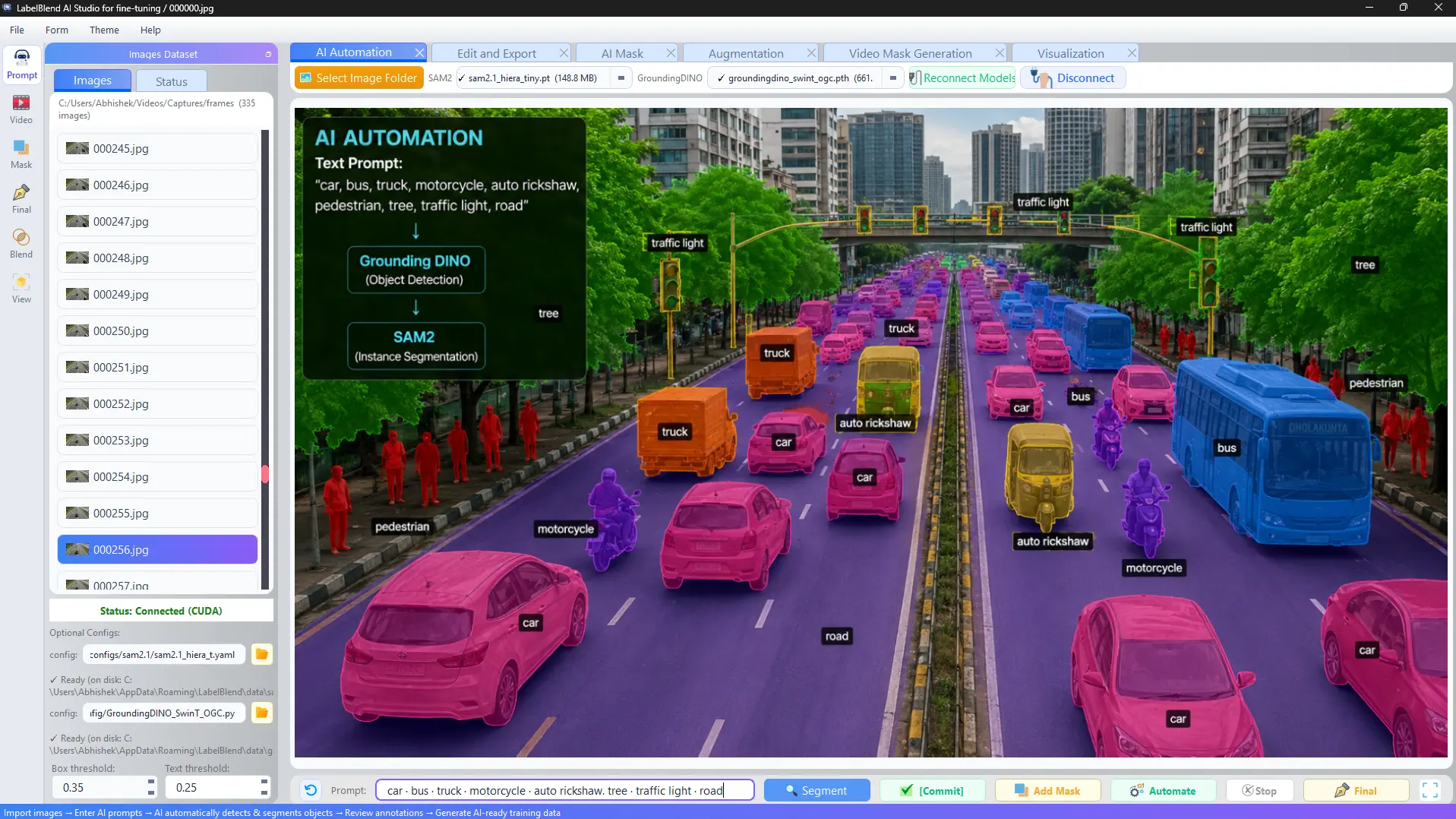
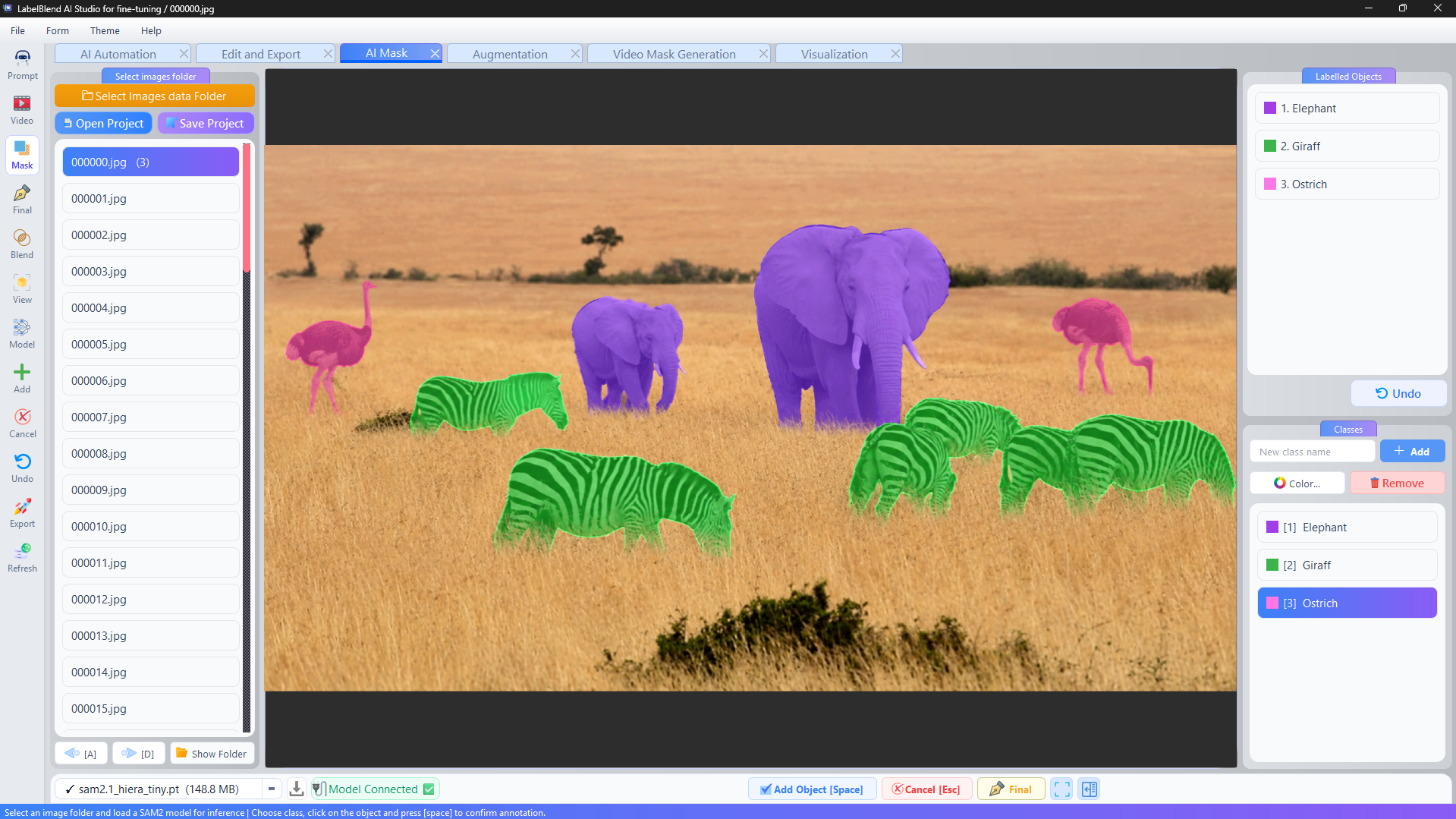
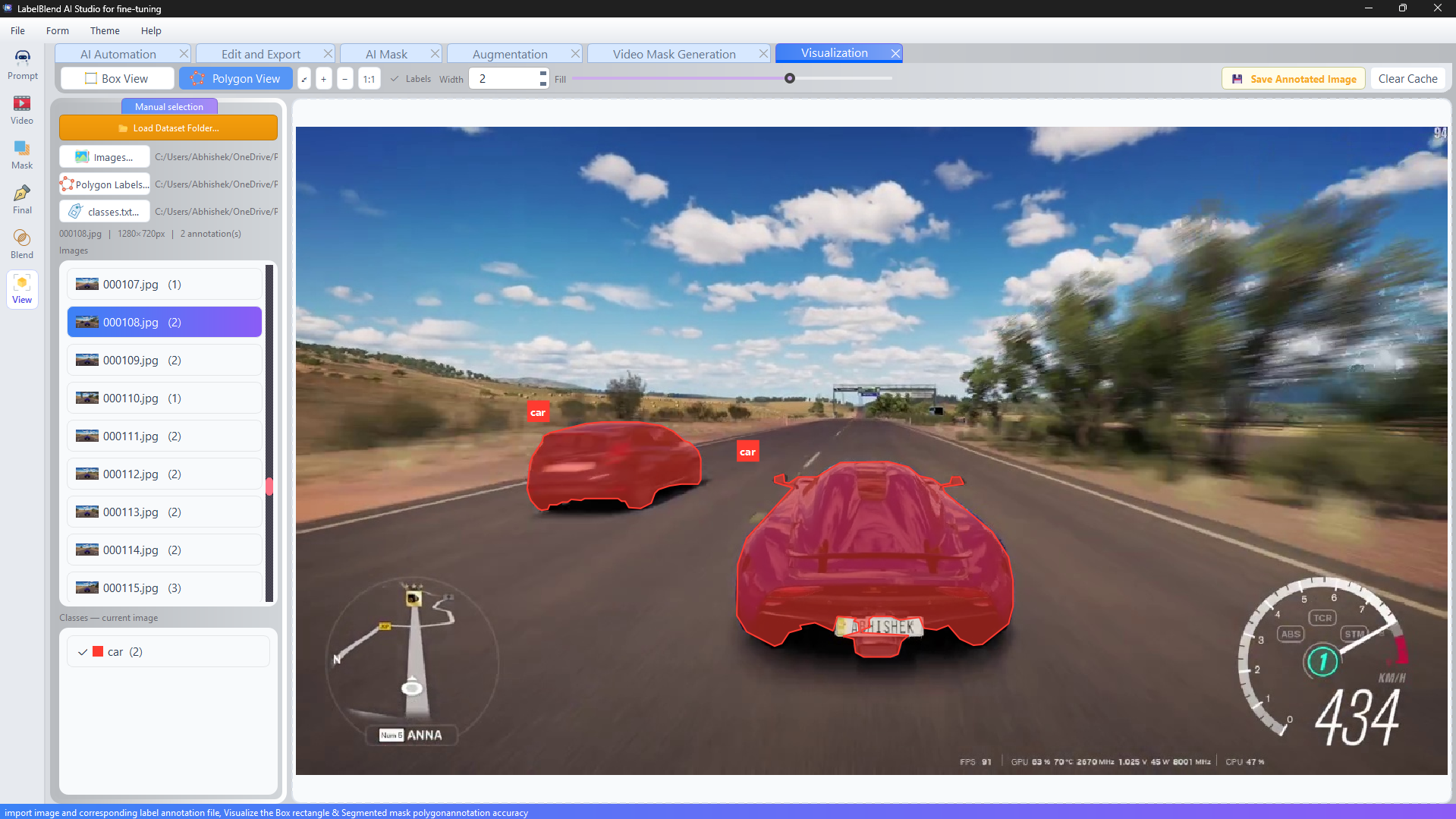
Every screen below is captured from LabelBlend AI Studio running on Windows.
Comparison
Traditional workflow vs. a unified workspace
Both approaches produce datasets. The difference is how many context switches sit between raw media and export.
Traditional workflow
- —Multiple tools for labelling, conversion and review
- —Manual labelling for every object in every image
- —Separate video frame extraction and re-annotation
- —Separate scripts for synthetic data and augmentation
- —Validation done by opening files manually
- —Export formats reconciled by hand
LabelBlend AI Studio
- ✓Unified desktop workflow across every stage
- ✓AI-assisted annotation with human review
- ✓Video import and SAM2 object tracking
- ✓Synthetic composition with automatic annotations
- ✓Built-in annotation viewer for validation
- ✓Batch resize, rename and dataset split
- ✓Box and mask dataset export
Use cases
Where LabelBlend fits into a project
Each workflow below maps to tools that already exist in the application.
Object Detection
- Problem
- Bounding-box datasets grow slowly when every object is drawn by hand.
- Workflow
- Load images → draw or prompt boxes → review in the editor → export box dataset.
- How LabelBlend helps
- Manual rectangles, text-prompted multi-class labelling and a box export path live in the same window.
Instance Segmentation
- Problem
- Polygon masks are the slowest annotations to produce manually.
- Workflow
- Load images → SAM2 assisted masks → refine vertices → export mask dataset.
- How LabelBlend helps
- SAM2 proposes masks, the editor lets you correct them, and vertex epsilon controls polygon density on export.
Image Classification
- Problem
- Class folders and naming conventions drift across contributors.
- Workflow
- Organise images → assign classes → batch rename/resize → split train/val.
- How LabelBlend helps
- Batch resize, rename and dataset split tools keep folder structure consistent.
Video Object Tracking
- Problem
- The same object must be annotated across hundreds of frames.
- Workflow
- Import video → select object → SAM2 tracking → generate annotated frames.
- How LabelBlend helps
- Track forward or backward through frames, with RAM limits and frame skipping for long clips.
Synthetic Data
- Problem
- Rare classes have too few real-world examples to train on.
- Workflow
- Cutouts + backgrounds → scale, rotate, place → generate images and labels.
- How LabelBlend helps
- Composition parameters produce new images with annotations written automatically.
Research Prototypes
- Problem
- Prototype experiments need small, well-controlled datasets fast.
- Workflow
- Prompt labelling → quick review → export → train → refine.
- How LabelBlend helps
- Short round-trips between labelling and export make dataset iteration practical.
Computer Vision Experiments
- Problem
- Comparing setups requires several dataset variants.
- Workflow
- Re-export with different sizes, splits and polygon settings.
- How LabelBlend helps
- Output size, quality and split ratio are configurable per export.
Dataset Preparation
- Problem
- A dataset can look complete and still break a training run.
- Workflow
- Inspect overlays → fix labels → validate → export.
- How LabelBlend helps
- The viewer renders boxes, polygons and labels over the source image before you train.
Who is it for?
Built for people who train models.
AI Engineers
Prepare and iterate on detection or segmentation datasets without stitching several utilities together.
Computer Vision Researchers
Build experiment-specific datasets, inspect annotations and re-export variations quickly.
Machine Learning Students
Learn the full dataset pipeline — labelling, review, export — in one guided workspace.
Startups
Move from a folder of raw footage to a first trainable dataset without hiring an annotation team.
Independent Developers
Run everything locally on a Windows machine with your own models and folders.
Research Labs
Standardise how a group labels, reviews and exports datasets across projects.
Technical Teams
Share a repeatable workflow so annotation quality does not depend on who did the work.
Trust & privacy
Your Data. Your Workspace.
LabelBlend is a desktop application. Annotation, segmentation, tracking, synthetic composition and export run on your own machine against your own folders.
Local processing
Images, videos, annotations and exports stay in the folders you select on your computer.
External model downloads
AI models such as SAM2 and GroundingDINO are downloaded from their public sources when you choose to install them.
Optional online services
Links to tutorials, documentation and updates open in your browser. These are optional.
Microsoft Store services
If you install from the Microsoft Store, Microsoft handles distribution, licensing and updates under its own terms.
Getting started
A short path from install to first dataset
- Install→
- Download models→
- Load images→
- Annotate→
- Review→
- Export→
- Train
Now available
Both editions are live on the Microsoft Store
LabelBlend Lite is free and covers manual annotation, review and export. LabelBlend Pro is a one-time ₹749 purchase that unlocks SAM2 segmentation, text-prompt labelling, video tracking and synthetic data generation.
Start building your dataset today
Install LabelBlend AI Studio, load a folder of images and produce your first reviewed, exportable dataset.