Synthetic data
Create More Training Data from What You Already Have.
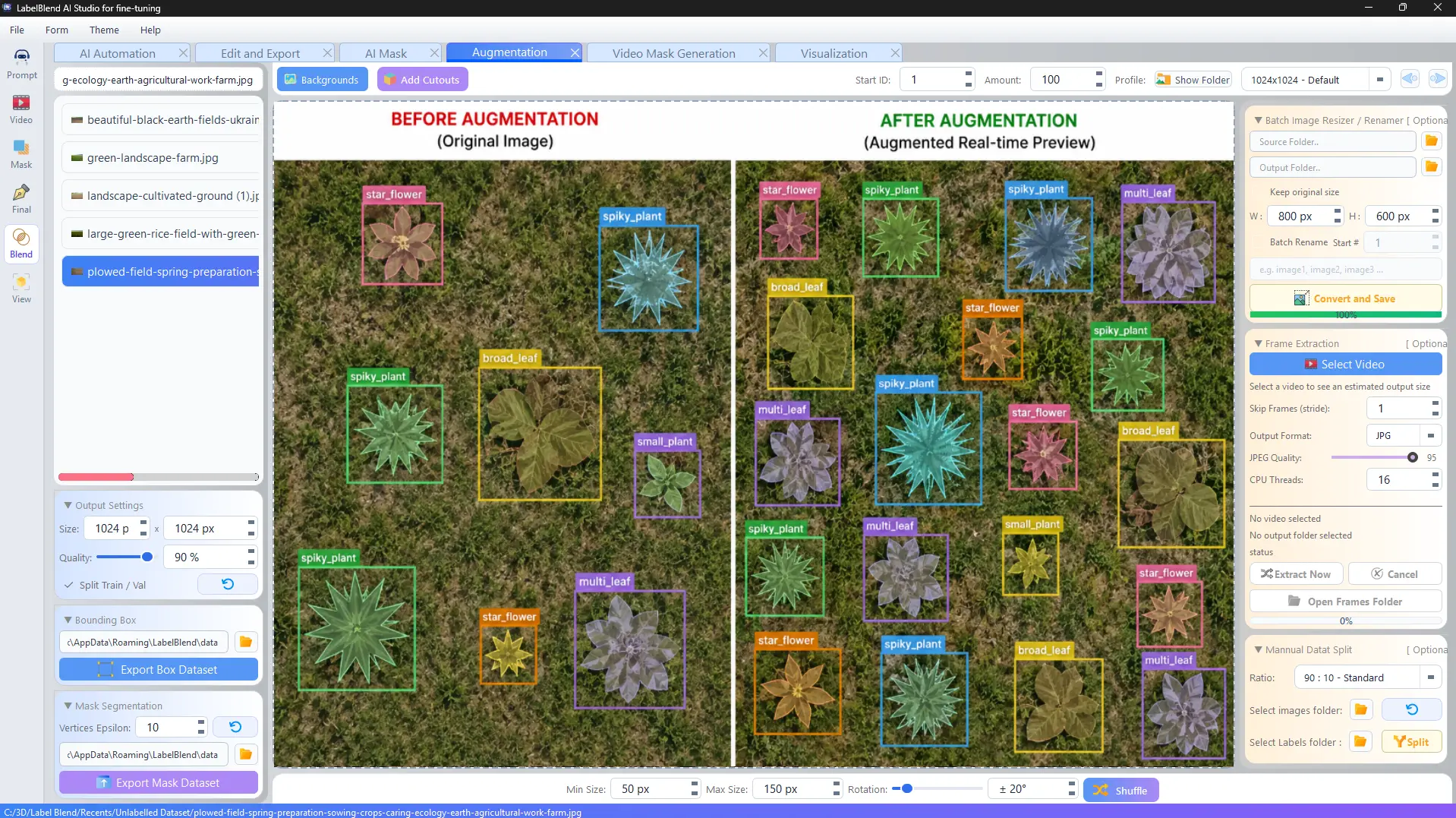
When a class only has a handful of real examples, composition can extend the dataset. LabelBlend places object cutouts onto background images with controlled scale and rotation, and writes the annotations for each placement automatically.
- Object cutouts→
- Backgrounds→
- Scale→
- Rotation→
- Composition→
- Dataset
The composition formula
Every generated image is a background plus one or more placed objects, with parameters you set before generation.
Object cutouts + Backgrounds + Scale + Rotation + Composition
= Synthetic dataset
- · Minimum and maximum object size in pixels.
- · Rotation range applied per placement.
- · Shuffle placement to avoid repeating layouts.
- · Start ID and amount to control how many images are produced.
- · Output size and JPEG quality per profile.
Automatic annotations
Generated images arrive already labelled.
Because the application places each object, it knows exactly where that object is. Bounding boxes and masks are produced as part of generation rather than as a separate labelling pass.
Box dataset export
Export bounding-box annotations to a folder you choose, with train/val split if enabled.
Mask dataset export
Export polygon annotations, with a vertices epsilon setting to control outline density.
Batch image tools
Resize, rename and convert source images before or after composition.