
Annotation viewer
Review Your Dataset Before You Train.
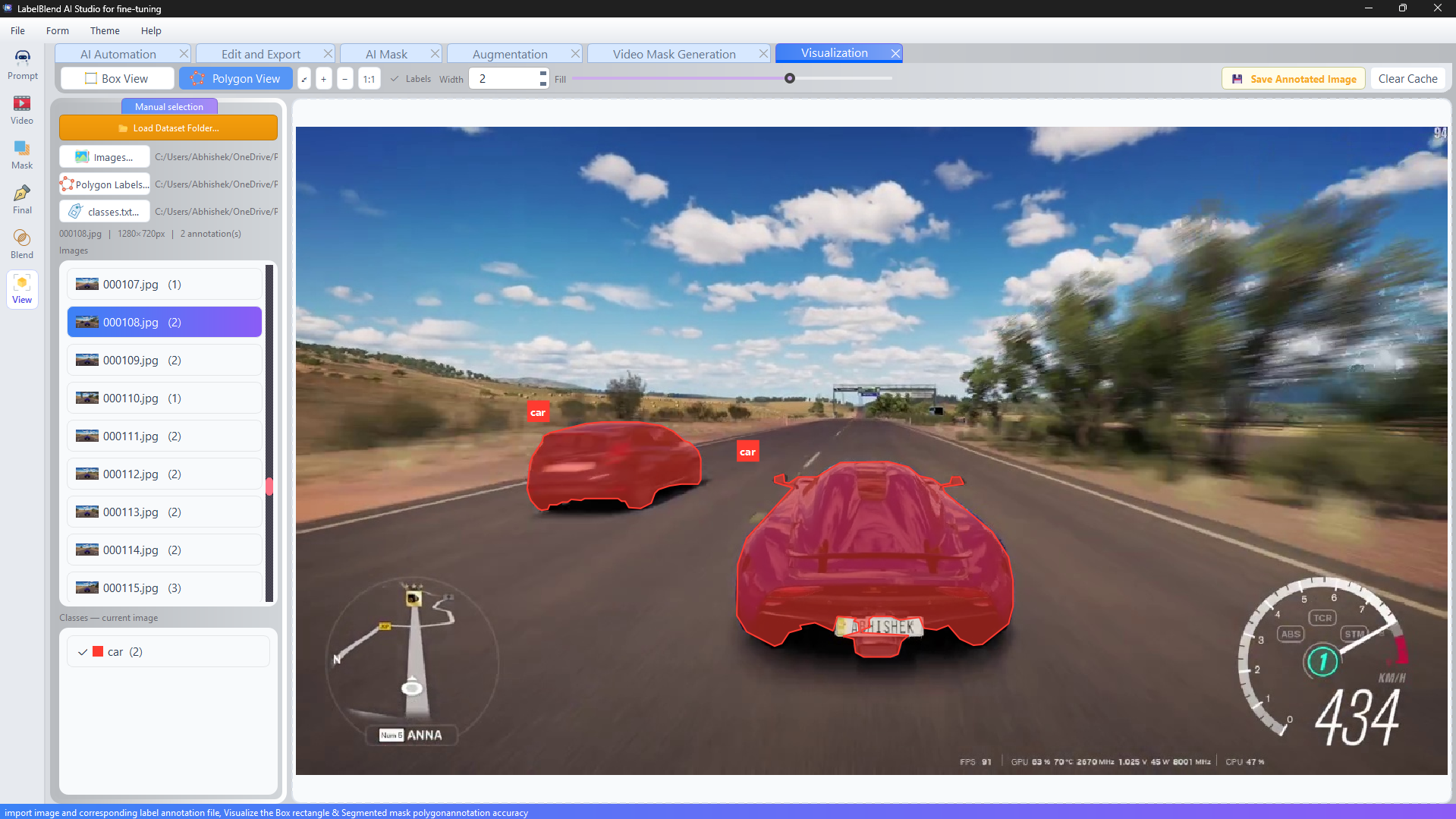
A dataset that looks finished can still contain missing labels, wrong classes or misaligned boxes. The viewer renders every annotation over its source image so problems are visible before a training run consumes hours of compute.
- Load dataset folder→
- Inspect→
- Correct→
- Re-export
Auto-detected dataset structure
Point the viewer at a folder containing images/, labels/ and classes.txt and it resolves the structure for you. If your labels live somewhere else, each path can be selected manually.
- · Box view and polygon view for detection and segmentation datasets.
- · Toggle class labels on or off.
- · Adjustable outline width and mask fill opacity.
- · Zoom in, zoom out and 1:1 reset.
- · Save an annotated image for documentation or reports.
- · Clear cache when a dataset changes on disk.
Validation checklist
What to look for before training
A short, deliberate review pass catches the majority of dataset problems.
Missing objects
Instances present in the image but absent from the label file.
Wrong classes
Correct geometry assigned to the wrong class id.
Loose boxes
Boxes that include large amounts of background.
Broken polygons
Outlines with too few vertices to describe the object shape.
Class imbalance
One class dominating the dataset by a wide margin.
Split leakage
Near-duplicate frames appearing in both train and validation.